
Demo Summary
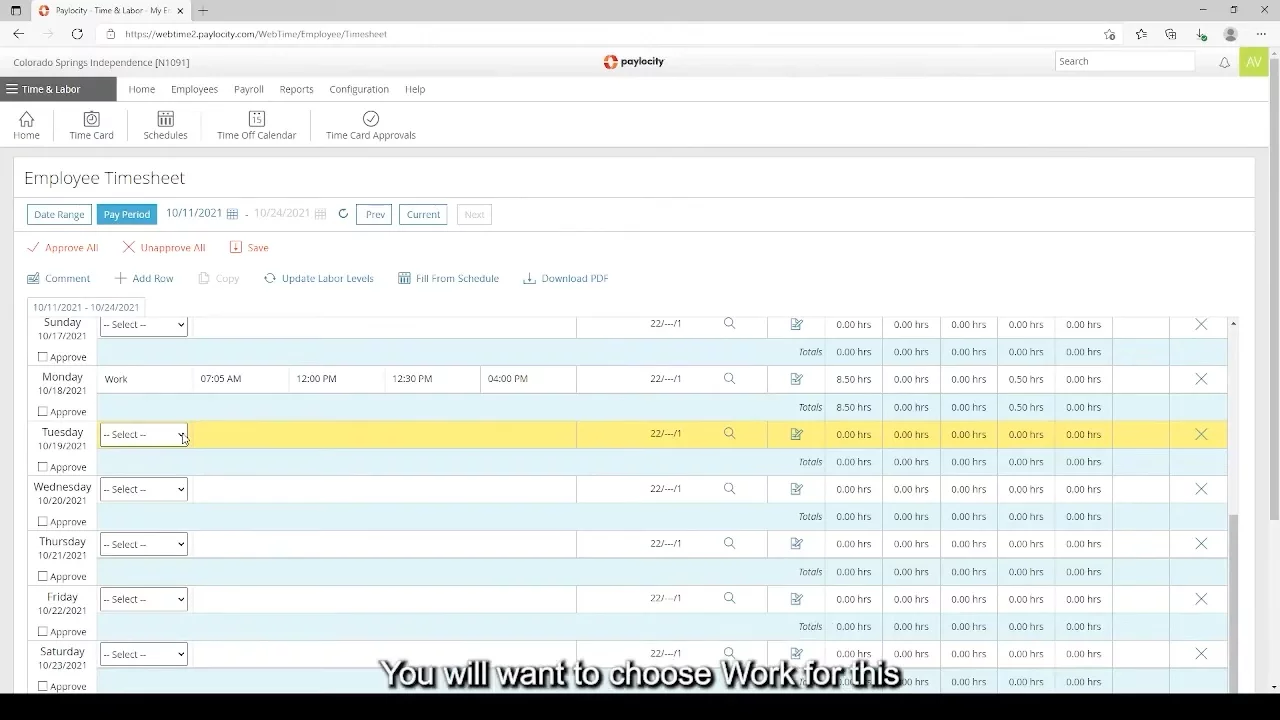
In this video, you'll learn how to enter your work hours on the Paylocity website. First, log in and find the "Time Entry" box. Click "Launch Time, Time and Attendance" to reach your timesheet. Here, you can input your start time, lunch start and end, and end time for the day. Don’t forget to mark PM for afternoon times. If you make a mistake, you can delete and re-enter the time. So, this video helps you accurately record your work hours to avoid errors and ensure you're paid correctly. Enjoy learning and have a great day!
AI-Detected Features
Introduction to Time EntryWelcome to the tutorial on entering time in Paylocity via the website. Instructions for the app version are available on the Independent Center's website.
00:11
Accessing the Time CardGuidance on navigating to the time entry section of the Paylocity self-service portal and launching the Time and Attendance feature.
00:38
Understanding the Timesheet LayoutExplanation of the columns on the timesheet including start time, lunch breaks, end time, and overtime information.
01:50
Entering Time for a Specific DaySteps to select work type and enter start and end times for a specific day, with adjustments for afternoon hours.
03:18
Adjusting Lunch BreaksInstructions on modifying default lunch periods if needed and saving the updated timesheet.
05:16
Correcting MistakesProcess for deleting and re-entering time entries if a mistake is made, ensuring changes are saved.
07:55

Paylocity
Paylocity is a comprehensive cloud-based human capital management (HCM) platform that helps businesses streamline HR, payroll, and workforce management processes.Learn more about PaylocityMore Demos (1)
Interactive Demos (0)
Useful Links & Resources
Related companies