LeadSquared

Demo Summary

In this video, you learn how to use Sierra’s reporting and dashboard tools in LeadSquared. First, you see the report page: how profiles control who can view each report, and how to pin and tag reports. Next, an admin creates a profile to share reports and dashboards with different user groups. Then, you learn about Sierra’s ready data sets (like leads and activities) that make report building faster. You’ll build a report step by step: choose a data set, add rows, columns, filters, charts, and basic calculations. Finally, you make a dashboard: add report widgets or an external link, set filters, share it, and set it as your home page. By the end, you’ll know how to create, share, and manage reports and dashboards to track key numbers.

AI-Detected Features

Introduction and Overview of TopicsOutline of the four main areas: Listing page and Report Administration, Sierra Data Sources, Report Builder, and Dashboard Builder.
00:02
Listing Page StructureExplore the Sierra reports home: left-side navigation (Profiles, Pinned, All, Bookmarks, Tags) and right-side report cards.
00:21
Report Card DetailsLearn the components of a report card: name, description, Sierra tag, pin/unpin, and actions (Edit Tags, Copy Embed URL).
01:41
Dashboard Listing BehaviorSee how the Dashboard tab mirrors report navigation and supports setting a Home Dashboard per profile.
03:00
Profiles Overview and ManagementUnderstand Profiles as a layer defining who sees which reports/dashboards, how to create profiles, set sharing criteria, and use the default profile and MySpace workspace.
05:08
Introduction to Sierra Data SourcesLearn how Sierra combines related tables into optimized data sources to simplify report building and speed analytics.
09:01
Selecting Data Source and Report Builder LayoutChoose your data source, then explore the Report Builder UI: Data, Filters, Charts, and the live preview panel.
11:32
Defining Rows, Columns, and ValuesUse row grouping to set row labels, value fields for metrics, and column grouping to pivot data into columns.
12:53
Predefined and Custom MetricsAdd built-in metrics or create your own field-based metrics, select aggregators, and apply number formatting.
14:06
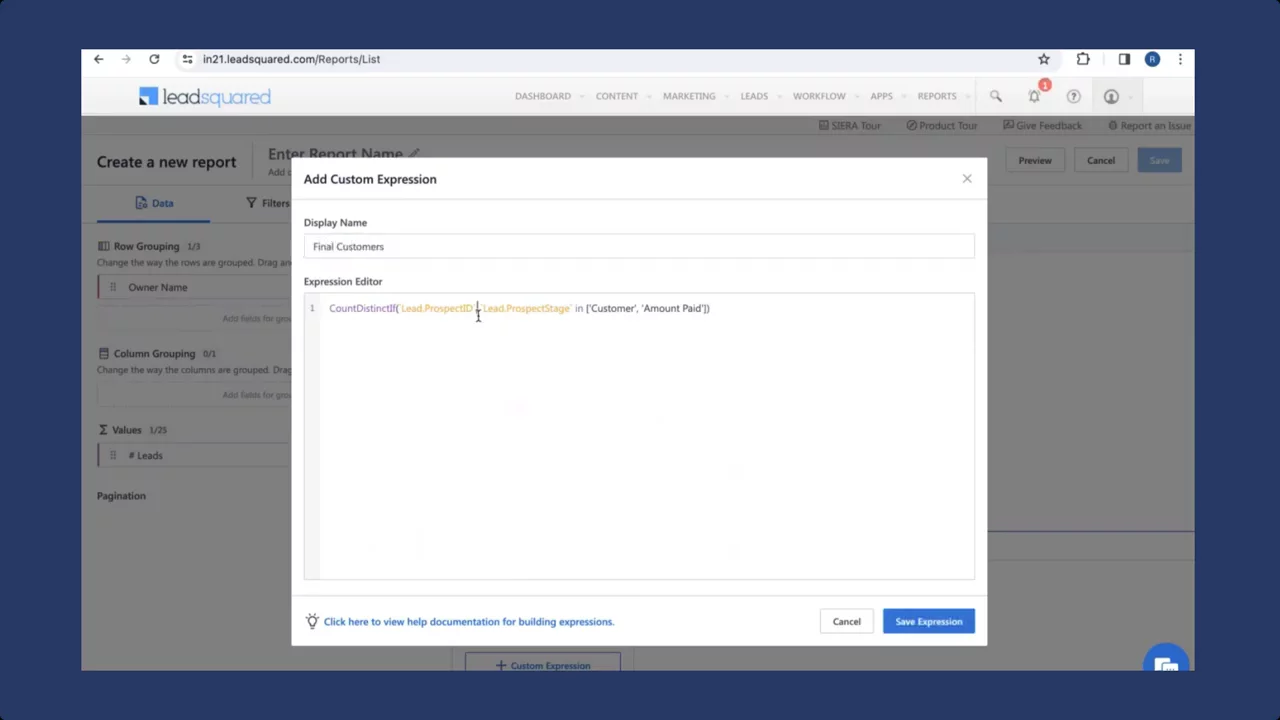
Custom Expressions with Expression BuilderWrite DAX-style expressions to compute conditional or calculated metrics beyond simple aggregations.
15:50
LeadSquared logo

LeadSquared

LeadSquared is a complete customer acquisition platform that combines CRM and marketing automation to help businesses improve sales execution and accelerate revenue growth.Learn more about LeadSquared

More Demos (1)

Interactive Demos (0)

Useful Links & Resources

Related companies

Clari logo

Clari

Helps businesses predict and grow their income using smart computer thinking.

Leadspace logo

Leadspace

Help businesses find and target the right customers to increase sales.

OpenGTM logo

OpenGTM

An AI-powered buyer intelligence platform that unifies sales, marketing, and RevOps to improve lead scoring, forecasting, and revenue alignment at an affordable price.