

Eversign
Eversign is a comprehensive electronic signature and document management platform that streamlines the process of creating, sending, and signing digital documents securely.Intro
Eversign, now operating as Xodo Sign following its acquisition by Apryse, has established itself as a competitive player in the electronic signature market. This review will help you discover how Xodo Sign performs against competitors, understand its security and compliance standards, and determine if it matches your organization's digital signature requirements. We'll analyze everything from small business workflows to enterprise-level document management needs.
Company Overview
• Founded: 2017 as Eversign by eversign GmbH (Vienna-based technology company)
• Current Name: Xodo Sign (following 2022 acquisition)
• Parent Company: Apryse
• User Base: Over 4 million daily active users globally
Eversign began with a mission to replace paperwork with secure, affordable electronic signatures. When Apryse acquired Eversign in 2022, they expanded beyond basic e-signatures. The platform now serves everyone from freelancers to Fortune 500 companies needing legally valid signatures across multiple countries.
Pricing Analysis
The Eversign platform offers enterprise-level features at competitive rates, making it attractive for small and medium businesses that need professional e-signature capabilities without premium costs.
Free Plan
• Limited monthly document signings
• Basic electronic signature functionality
Business Plans
• Increased document limits
• Advanced workflow management
• Enhanced integrations with business tools
Enterprise Solutions
• Unlimited document processing
• Advanced security features
• Custom integration support
Eversign offers a free trial period and remains significantly cheaper than premium competitors like DocuSign, despite some users mentioning pricing increases over time.
Benefits
Eversign delivers operational advantages that impact business document efficiency. The platform balances robust security with user-friendly design, offering a cost-effective alternative to premium solutions without sacrificing professional capabilities.
• Multi-party signing with seamless tracking
• Flexible signature options and authentication methods
• Cost-effective pricing for small to medium businesses
• Strong legal compliance and security standards
• Automated workflow management and reminders
• Comprehensive integration ecosystem
• User-friendly interface with minimal learning curve
Features
Eversign delivers a comprehensive suite of electronic signature features designed to streamline your document workflows while maintaining the highest security standards. The platform combines intuitive signing capabilities with robust automation tools, making it equally suitable for individual professionals and enterprise teams managing complex multi-party agreements.
• Multi-Party Signing and Tracking
• Flexible Signature Options
• Advanced Authentication and Security
• Document Workflow Automation
• Template Management System
• API and Integration Capabilities
• Cloud Storage Connectivity
Multi-Party Signing and Tracking
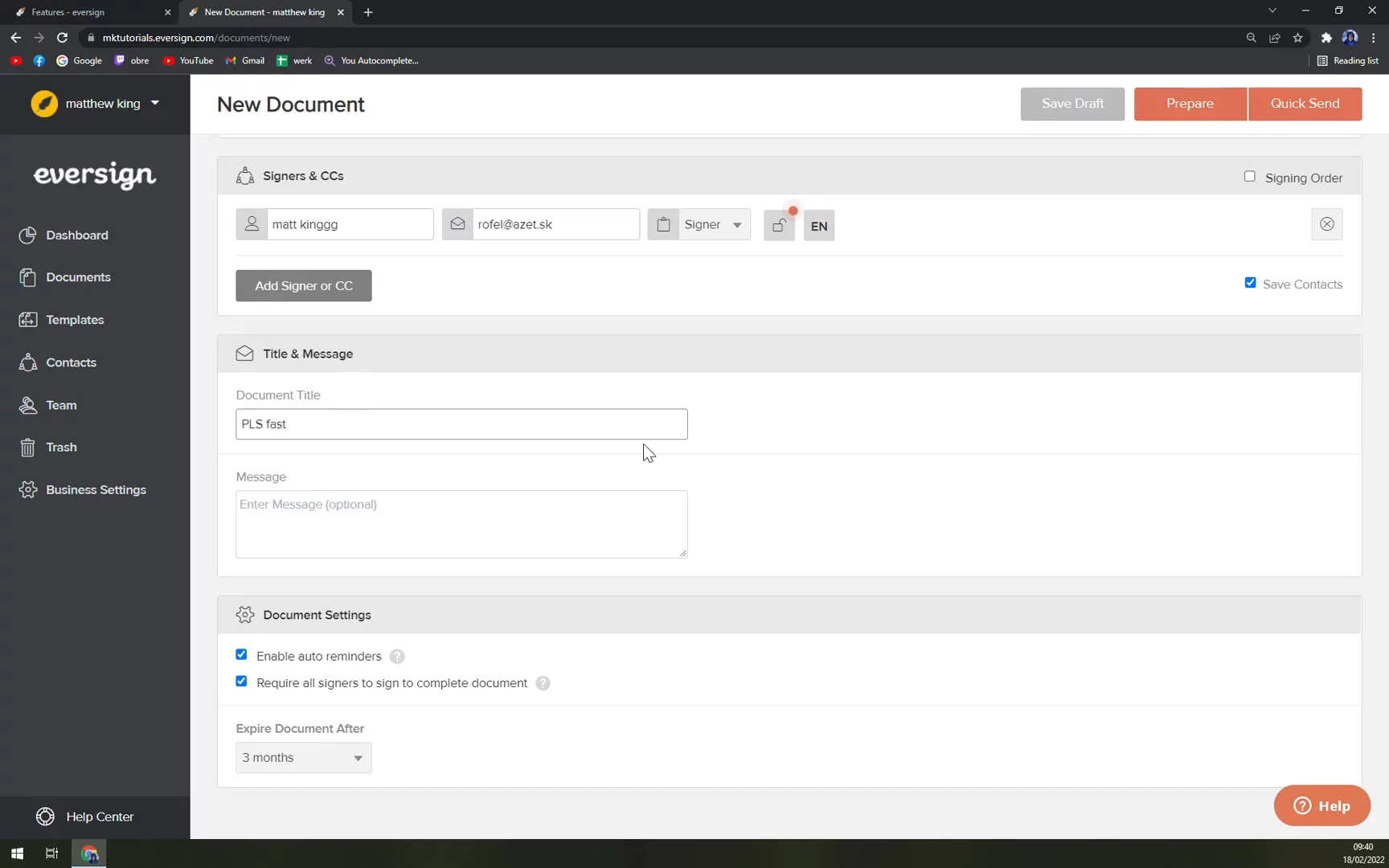
Track multiple signers' status from a central dashboard with real-time updates. Configure sequential signing when approval order matters or parallel signing for faster completion. Automatic notifications keep everyone informed without manual follow-up.
Flexible Signature Options
Sign your way — type, draw, upload, or use saved signatures from any device. Customize with various field types including initials, checkboxes, and date fields to create comprehensive agreements that meet all your documentation needs.
Document Workflow Automation
Set effective automatic reminders with a 97% user satisfaction rate. Schedule agreements to send at optimal times and create event-triggered signing processes. Send documents in bulk to eliminate repetitive manual tasks.
Template Management System
Save time with reusable templates featuring autofill capabilities for text and data fields. Share templates across your organization for consistency and organize with version control and template libraries.
Cloud Storage Connectivity
Integrate directly with Google Drive, Dropbox, Box, and OneDrive. Automatically save signed documents to your preferred cloud storage while maintaining consistent folder structures and export in multiple formats with embedded signatures.
Integrations Ecosystem
Eversign seamlessly connects with your existing tools, eliminating isolated systems and creating automated workflows that accelerate signature processes across your business.
• CRM Platforms – Salesforce, Zoho, and custom CRM systems.
• Cloud Storage – Google Drive, Dropbox, Box, OneDrive.
• Productivity Suites – Google Docs and Office 365.
• No-Code Automation – Zapier and Relay.app connections.
• Custom Development – Full REST API for tailored integrations.
• HR Management – Streamlined onboarding workflows.
• Industry-Specific Tools – Real estate, healthcare, and legal platforms.
Security and Compliance
Eversign provides enterprise-grade security and regulatory compliance for organizations handling sensitive documents. The platform combines robust security controls with comprehensive legal framework support, ensuring signatures meet industry requirements and withstand legal scrutiny.
• SOC 2 Type 1 Certified - Meets strict security, availability, and privacy controls.
• HIPAA-Supporting Features - Includes encryption, detailed logging, and access controls for healthcare organizations.
• GDPR Compliance Support - Offers Data Processing Agreement and impact assessment assistance.
• Legal Framework Coverage - Complies with ESIGN, UETA, and eIDAS regulations for binding signatures.
• Tamper-Evident Security - Cryptographic protection flags unauthorized document changes.
• Comprehensive Audit Trails - Records every action with timestamps, IP addresses, and user details.
Customer Support and Resources
Eversign provides support channels and documentation to help users implement electronic signature workflows effectively. While direct customer service could improve in responsiveness, the platform offers comprehensive self-service resources.
• Help center with legal and compliance documentation.
• API documentation for developers.
• Knowledge base articles covering platform features.
• Legal resources including terms of service and privacy policies.
• HIPAA and security compliance guides.
Help Center and Documentation
Eversign's help center addresses key questions about legal compliance and functionality, including detailed guidance on legal binding requirements and HIPAA compliance for regulated industries.
Developer and Compliance Resources
Technical teams benefit from comprehensive API documentation for integration, while legal teams can access data processing agreements for GDPR compliance. Some users note opportunities for improvement in customer service responsiveness, particularly for time-sensitive account inquiries.
Pros
• Intuitive, user-friendly interface.
• Comprehensive multi-party signing with tracking.
• Cost-effective compared to enterprise competitors.
• Robust security with SMS/PIN verification and audit trails.
• Multiple signature options (typed, drawn, uploaded).
• Automated reminder system.
• Strong legal compliance frameworks.
• Extensive third-party integrations.
Cons
Best fit for:
Employee Count: 1-1,000+
Location: Global
Industries: Diverse, including Technology, Financial Services, Healthcare, Real Estate, Legal, and Professional Services
Job Titles: HR Director/Manager Sales Director Small Business Owner/Entrepreneur Chief Information Officer (CIO) Operations Manager
Company Summary
Eversign, now known as Xodo Sign, is a company that helps people and businesses sign documents online. Instead of using paper and pen, you can sign contracts and agreements on your computer or phone. This makes it faster and easier to handle important paperwork.
Price Estimate
Xodo Sign offers several pricing plans:
- Free Plan: Sign up to 3 documents per month and use 1 template.
- Basic Plan: For $9.99 per month (billed yearly), you get unlimited documents and 3 templates.
- Professional Plan: At $39.99 per month (billed yearly), this plan includes unlimited documents, 10 templates, and supports up to 5 users.
- Professional Plus Plan: For $99.99 per month (billed yearly), it offers unlimited documents, 25 templates, and supports up to 15 users.
- Enterprise Plan: Custom pricing tailored to your needs.
For more details, visit their pricing page. (eversign.com)
Who is Eversign for?
Xodo Sign is designed for a wide range of users:
- Company Size: Suitable for individuals, small and medium-sized businesses, and large enterprises.
- Job Titles: Common users include:
- Business Owners
- Sales Managers
- HR Professionals
- Legal Advisors
- Financial Officers
- Industries: Serves various industries such as:
- Finance
- Legal
- Sales
- Human Resources
- Technology
Features, Functionalities, and Benefits
Xodo Sign offers several key features:
- Electronic Signatures: Sign documents securely from any device.
- Document Editor: Edit, send, and sign documents quickly.
- Templates: Create reusable templates for frequently used documents.
- In-Person Signing: Allow clients to sign documents directly on your device.
- App Integrations: Connect with apps like Google Drive, Dropbox, and more.
- High-Level Security: Your data is encrypted using 256-bit SSL for safety.
- Audit Trail: Keep track of all document activities for transparency.
Use Cases
Companies use Xodo Sign for various purposes:
- Financial Department: Manage NDAs, employment contracts, and asset purchase agreements.
- Legal Department: Handle retention agreements, shareholder agreements, and merger documents.
- Sales Department: Process new hire paperwork, price quotes, and sales proposals.
- HR Department: Oversee NDAs, employment contracts, and independent contractor agreements.
For more details, visit their website.
Who Are Their Best Customers?
Xodo Sign serves a diverse range of customers, including individuals, small businesses, and large enterprises. While specific customer stories are not provided, the platform is tailored to meet the needs of various industries and company sizes.
What Makes Eversign Different?
Xodo Sign stands out by offering a user-friendly platform that integrates seamlessly with popular apps, provides high-level security, and supports various signing methods, including in-person signing. This flexibility and ease of use make it a preferred choice for many businesses.
Legal Info:
For legal information, you can refer to Xodo Sign’s Privacy Policy and Terms of Service on their website.
More Demos (1)
Interactive Demos (0)
Useful Links & Resources
Related companies

Oneflow AB
Streamlines digital contract management with automated workflows, secure e-signatures, and seamless integrations.

RPost
Secure e-signature and email platform for compliant digital transactions and communications.

Dotloop
All-in-one real estate transaction management platform for agents, brokers and teams.