Salesforce

Demo Summary

You’ll see a step-by-step guide to Salesforce CRM. First, the demo shows how to pick a plan, sign up, and start a free trial. Then you learn to use the home page to add leads, accounts, and contacts. You watch how to turn leads into sales deals and follow each step from first call to closing the deal. You’ll also see how to set tasks, quotes, and support tickets, use a calendar, run reports and dashboards, and start email or event campaigns. Salesforce solves messy customer data by giving teams one cloud system to track every interaction and grow sales.

AI-Detected Features

IntroductionWelcome to the full in-depth Salesforce CRM demo. Get ready to learn how Salesforce can transform your customer relationship management.
00:00
Exploring Salesforce CRM and PlansVisit the Salesforce website to see how CRM can help your business, learn about its features, and explore the different user scenarios and integrations.
00:20
Pricing Tiers and Free Trial SetupReview Salesforce’s four pricing plans—Essentials, Professional, Enterprise, and Unlimited—and start your free trial to test the platform risk-free.
01:00
Signing Up and Guided TourFill in your details—name, role, company, employee count—and launch the guided Sales Cloud tour to get hands-on introduction to key features.
02:00
Email Verification and Dashboard AccessVerify your identity via email, set up your password and security question, and log in for the first time to reach your Salesforce dashboard.
05:00
Salesforce Dashboard OverviewNavigate the Home page: view sales charts, stalled deals, key deals, tasks, opportunities, and follow setup prompts to customize your dashboard.
07:30
Lead ManagementUnderstand what leads are, view and filter open leads, import contacts in bulk or add a new lead manually, and learn how to qualify and convert them into opportunities.
09:00
Account ManagementAccess all accounts, import or create new accounts with detailed information, and explore account views and record details for effective customer tracking.
15:40
Contact ManagementManage contacts linked to your accounts: import from files, sync with email, add new contacts, and keep essential fields up to date.
21:20
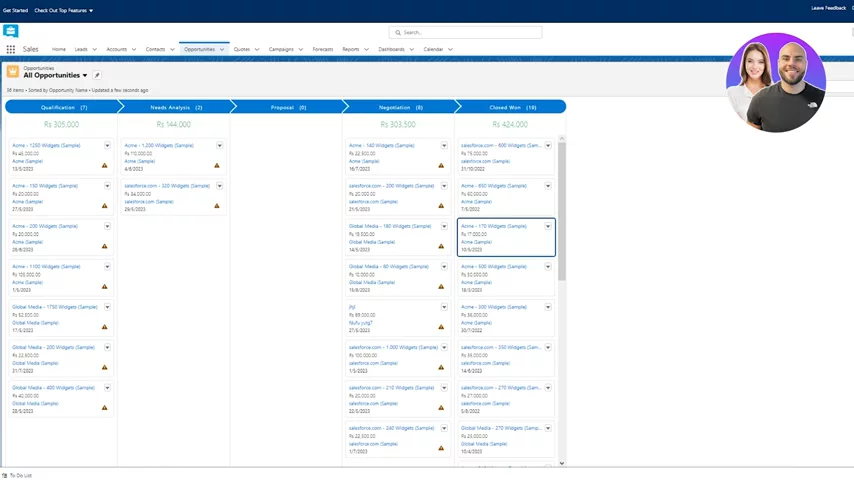
Opportunity ManagementCreate and track opportunities: set probability, forecast category, amount, close dates, move through sales stages, and use list or Kanban views.
23:20
Salesforce logo

Salesforce

Salesforce is the customer company, providing cloud-based software designed to help businesses connect with their customers in innovative ways.Learn more about Salesforce

More Demos (1)

Interactive Demos (0)

Useful Links & Resources

Related companies

Close logo

Close

A sales engagement CRM for SMB.

Agile CRM logo

Agile CRM

Manages customer relationships, automates sales, marketing, and service processes for businesses.

monday CRM logo

monday CRM

The CRM that's simple to set up and easy to use.