
Demo Summary
Video shows how Hubstaff tracks work time on desktop and mobile apps. You’ll learn how to start and stop the timer, see screenshots and website visits (if your company turns on those), and share your GPS on mobile. You control when tracking runs and can view or delete your own data. Hubstaff helps teams track hours and work without meetings, fills out time cards for you, and makes sure you get paid on time.
AI-Detected Features
Introduction to Hubstaff Data TrackingWelcome to the video and a brief overview of Hubstaff’s commitment to transparency, efficiency, and valuing employee privacy and empowerment.
00:00
User Control and TransparencyHow team members control when timers start and stop, what proof-of-work (screenshots, websites) is recorded, notification alerts, and granting GPS permissions.
00:26
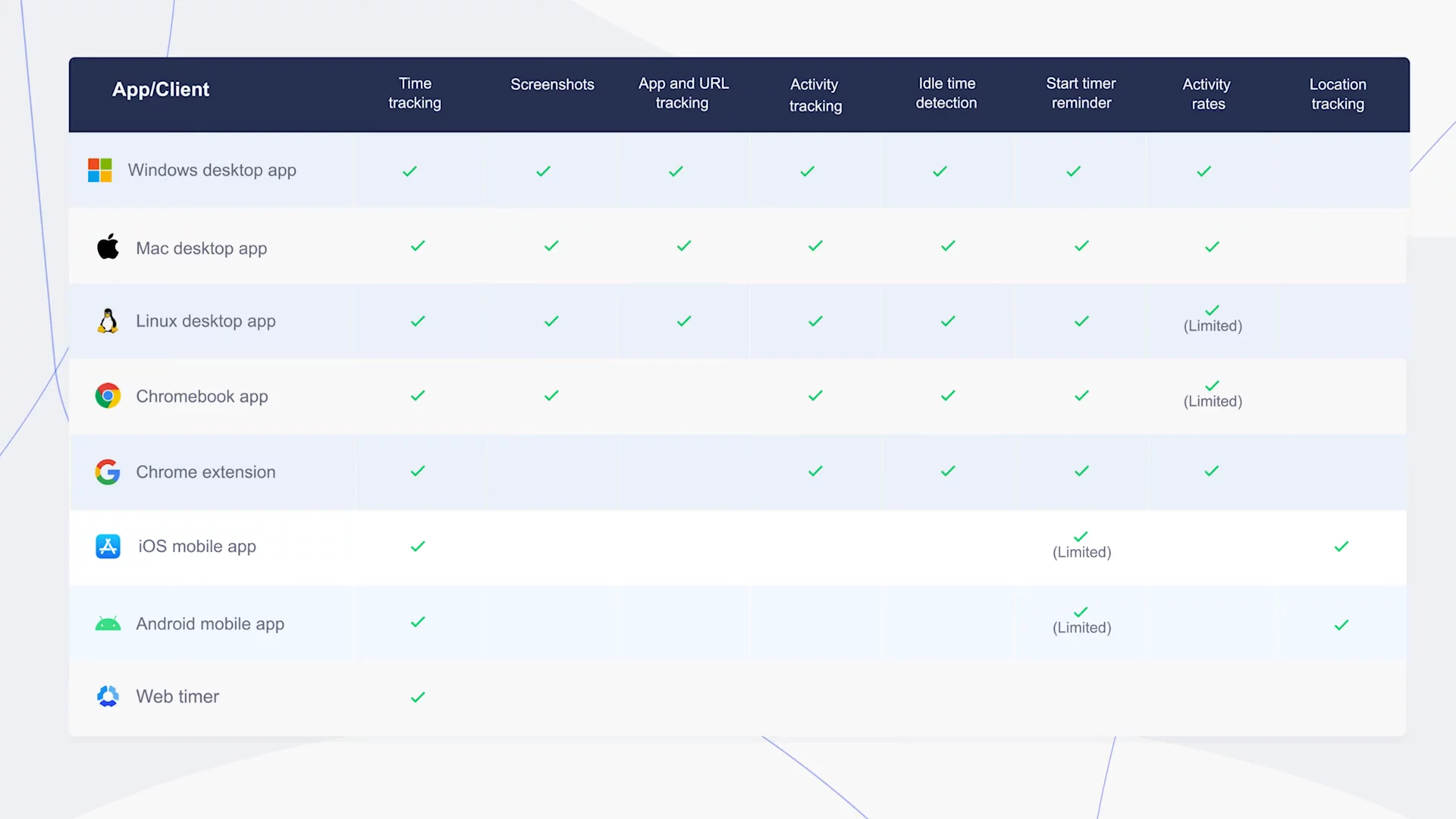
App Features by PlatformA look at which activity tracking and proof-of-work features are available on desktop versus mobile (Android and iOS), including location tracking on mobile.
01:37
Data Access and Privacy PoliciesHow you can view and delete your own time entries and recorded data, and Hubstaff’s guarantee that your data will never be sold to third parties.
02:00
Benefits of Tracking CapabilitiesThe advantages of proof-of-work for remote teams, reducing needless check-ins, making informed decisions, automated clock-in/out, reminders, idle timeouts, and timely payments.
02:26
Conclusion and SupportFinal recap of Hubstaff’s features and an invitation to contact Hubstaff support with any further questions.
03:41

Hubstaff
Hubstaff is a powerful workforce analytics solution for distributed, remote, and in-office teams.Learn more about HubstaffMore Demos (1)
Interactive Demos (0)
Useful Links & Resources
Related companies