

monday CRM
Monday CRM helps businesses streamline their sales processes and manage customer relationships efficiently.Intro
Looking for a CRM that doesn't become a full-time job to manage? Our Monday CRM review reveals how this platform offers visual pipelines, automation, and team communication in a package designed for usability.
In this detailed Monday CRM review, we will examine what it really offers, how it compares to competitors, and whether it deserves your attention.
Let's look beyond the marketing claims to explore pricing, user experiences, and whether it's the right fit for your sales team.
Company Overview
- Location: Headquartered in Tel Aviv, Israel, with offices in New York, London, Sydney, São Paulo, and more
- LinkedIn Page: Monday CRM LinkedIn
- Website: monday.com
- Founded: 2012 by Roy Mann and Eran Zinman
- Team Size: Approximately 3,100 employees globally
Monday CRM builds on the success of Monday.com’s visual platform, offering a flexible solution tailored for sales teams. It blends CRM functionality with the broader capabilities of the Work OS.
Pricing Analysis
The following is a breakdown of Monday CRM’s pricing and how it compares to competitors.
- Free plan includes unlimited contacts and pipelines for up to 2 users
- Paid plans range from $12 to $28/user/month, billed annually
- Enterprise plan offers custom pricing with advanced features
- Standard and Pro tiers add email sync, automations, and forecasting
Benefits
The following is a summary of the key benefits users experience with Monday CRM.
- Highly rated for usability, with scores averaging 4.7/5 or 8/10
- Visual, drag-and-drop interface makes setup fast and intuitive
- Customizable views and fields adapt to any sales process
- Color-coding and conditional logic make data easy to understand and act on
- Flexible design improves adoption rates, especially for small teams
Key Features and Functionalities
The following highlights the standout features that make Monday CRM a powerful and flexible sales tool.
- Visual boards with Kanban, calendar, timeline, and Gantt views for flexible sales tracking
- Customizable workflows and conditional logic tailored to unique sales cycles
- AI-powered insights recommend actions based on data patterns and sales performance
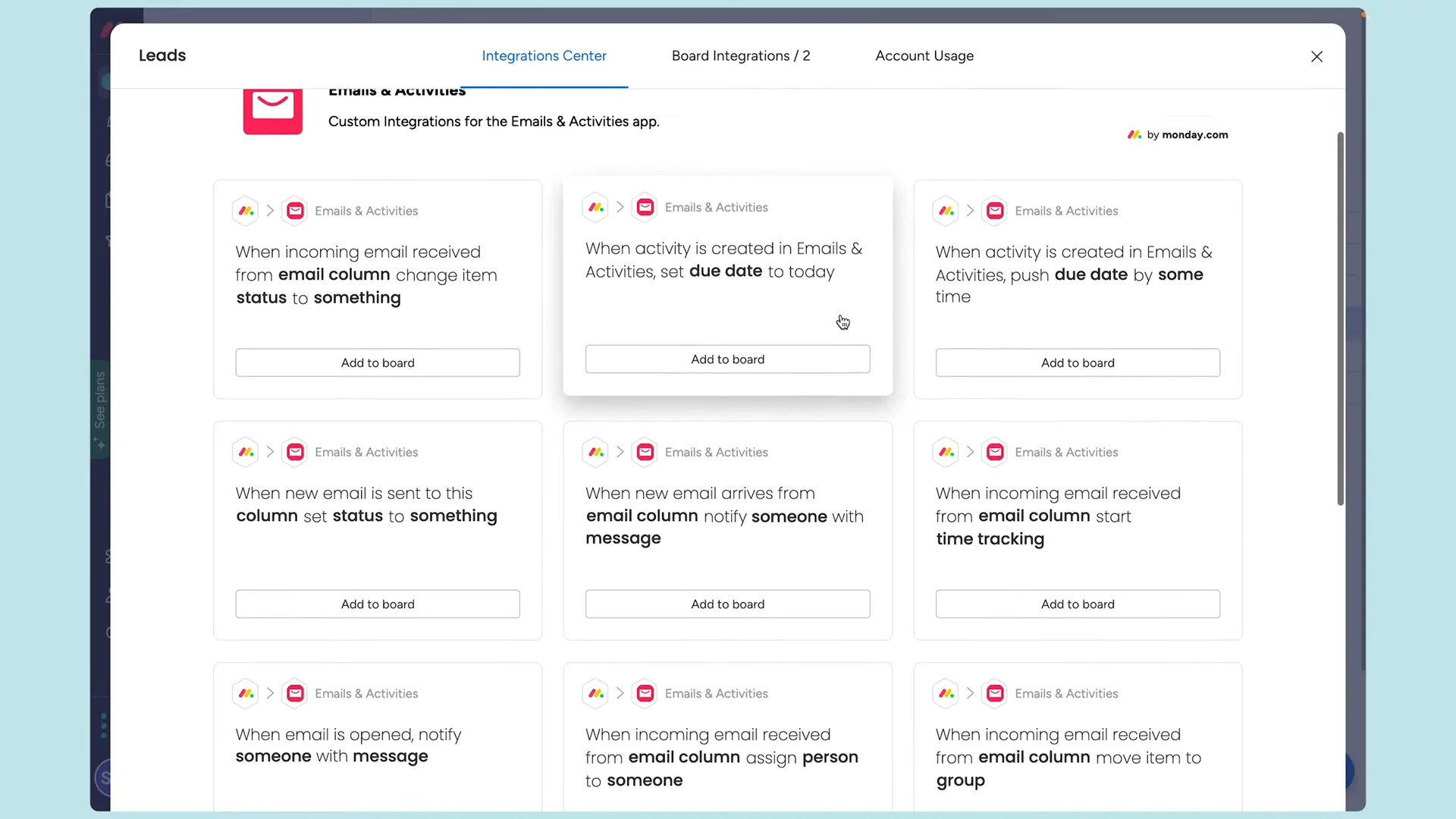
- Automation tools eliminate repetitive tasks like emails and status updates
- Built-in email marketing with campaign tracking and pipeline integration
Integration Capabilities
The following outlines Monday CRM’s integration capabilities and how they support a connected sales workflow.
- Connects with over 200 tools across sales, communication, marketing, and finance
- CRM integrations with Pipedrive, HubSpot, Salesforce, and Zoho for smooth migration
- Links to communication tools like Slack, Teams, Gmail, Outlook, and Zoom
- Document syncing with Google Drive, Dropbox, and OneDrive
- Custom automation via Zapier and Make expands workflow flexibility
Security and Compliance
Monday CRM emphasizes strong data security and compliance, making it a reliable choice for teams handling sensitive information. The platform offers the following protections and certifications:
- Certified for ISO 27001, ISO 27018, and SOC 2 Type II
- HIPAA compliance available starting at the Standard plan
- Enterprise-grade encryption with TLS 1.2 (in transit) and AES-256 (at rest)
- Role-based permissions for detailed access control
- Two-factor authentication and SAML 2.0 SSO for secure logins
Customer Support and Resources
Monday CRM is widely praised for its customer support, earning high marks for responsiveness and expert help. Users have access to multiple support options and self-guided resources, including:
- 24/7 live chat support for all paid plans
- Dedicated email and phone support for higher-tier and enterprise users
- Customer Success Managers for personalized enterprise guidance
- Extensive knowledge base and video tutorials for self-service
- Active community forums for peer support
Pros
- Visual interface makes sales data easy to understand and customize without technical skills.
- Collaboration tools unite sales, marketing, and support teams for faster, aligned workflows.
- AI-powered recommendations and automation reduce repetitive tasks and boost productivity.
- Email marketing integration and 200+ app connections streamline communication and data entry.
- Reliable customer support and a free tier make the platform accessible and user-friendly for all team sizes.
Cons
- Advanced features like sales forecasting and lead scoring are limited to higher-tier plans.
- The platform’s flexibility can overwhelm new users, creating a steep learning curve.
- Using both Monday Work Management and Sales CRM may cause confusion and data duplication.
- Data migration can be tricky, with formatting issues and occasional data loss.
- AI suggestions still need human review and may not always be relevant.
Company Summary
monday CRM is a tool that helps businesses keep track of their customers and sales. It lets teams organize information about their clients, manage sales activities, and work together more easily. (monday.com)
Price Estimate
monday CRM offers different pricing plans based on team size and features. For example, the Basic plan starts at $12 per seat per month, while the Standard plan is $17 per seat per month. For more details, visit their pricing page: (monday.com)
Who is monday CRM for?
monday CRM is designed for businesses of various sizes, from small teams to large companies. It’s especially useful for:
- Sales Managers
- Marketing Coordinators
- Customer Support Representatives
- Project Managers
- Business Owners
Industries that benefit from monday CRM include:
- Business Services
- Real Estate
- Software & IT Services
- Media & Communications
- Manufacturing
Features, Functionalities, and Benefits
Customizable Pipelines: Tailor your sales process to fit your team’s needs without needing a developer. (monday.com)
Email Integration: Connect your Gmail or Outlook to send and receive emails directly within the platform. (monday.com)
Automations: Save time by automating repetitive tasks like assigning leads or setting reminders. (monday.com)
Dashboards: Create visual reports to track sales progress and team performance. (monday.com)
Mobile App: Manage your sales activities on the go with the mobile app. (monday.com)
Use Cases
Companies use monday CRM for:
Lead Management: Collect and qualify leads from various sources in one place. (monday.com)
Deal Tracking: Monitor the progress of sales deals through customizable pipelines. (monday.com)
Customer Communication: Centralize emails and interactions with clients for better follow-up. (monday.com)
Sales Forecasting: Predict future sales and set targets based on current data. (monday.com)
Post-Sales Management: Oversee client projects and track collections after closing deals. (monday.com)
Who Are Their Best Customers?
Notable customers include:
Dominic Harris, Co-Founder: “I couldn’t even comprehend how we would report without monday CRM.” (monday.com)
Lizzie Post, Co-president: “It is saving us time, it is keeping us organized, and it is working. We are so happy to have found monday CRM.” (monday.com)
Luca Pope, Global Client Solutions Manager: “Because monday CRM is much easier to use than our old CRM, it requires less training.” (monday.com)
What Makes monday CRM Different?
monday CRM stands out because it’s fully customizable without needing coding skills, integrates seamlessly with popular tools like Gmail and Outlook, and offers powerful automation to streamline sales processes. (monday.com)
Legal Info:
For more information, you can visit their Privacy Policy and Terms of Service pages.
More Demos (1)
Interactive Demos (0)
Useful Links & Resources
Related companies

Close
A sales engagement CRM for SMB.
Agile CRM
Manages customer relationships, automates sales, marketing, and service processes for businesses.

folk
folk is the CRM for agencies and founders.