
CallCloud
CallCloud turns your dialer into a power dialer with a simple Chrome Extension integration.Intro
Good communication tools can transform your sales process from tedious manual dialing into smooth, efficient outreach. In this CallCloud Review, we'll explore how this cloud-based software platform helps businesses manage their telecommunication operations from anywhere, working with your existing sales stack to boost productivity and connection rates.
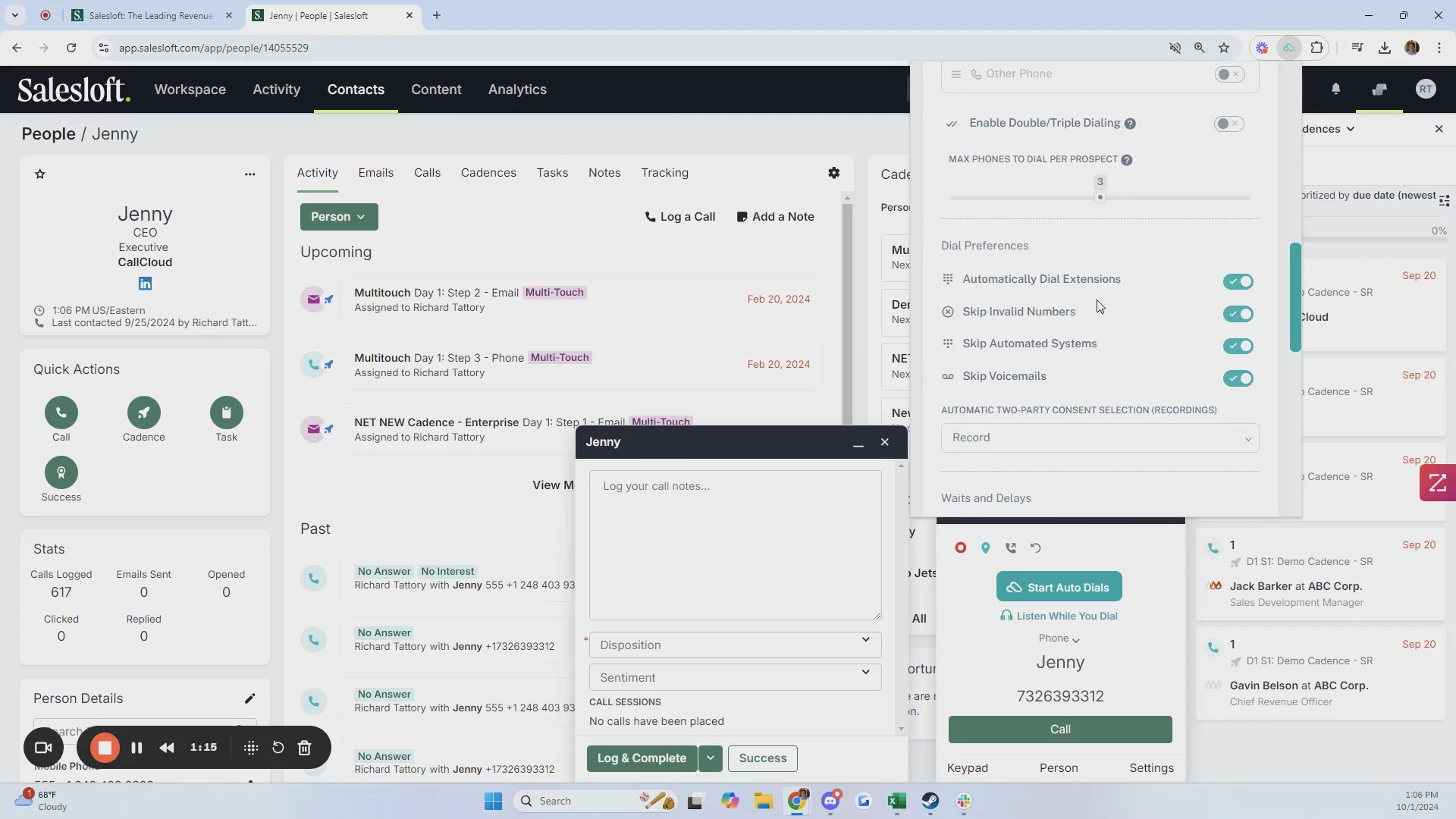
Unlike traditional phone systems, CallCloud zeroes in on making outbound calling campaigns more efficient by automating repetitive tasks. It's a powerful tool for automating outbound calling, increasing agent productivity, and improving call connect rates that integrates with popular sales engagement platforms like Salesloft, Outreach, and HubSpot, potentially doubling your call volume while cutting down on admin work.
But does it fit what you need? Let's explore what CallCloud offers, its strengths, and where it might fall short in this comprehensive CallCloud Review.
Company Overview
- Location: United States
- Website: www.callcloud.app
- Founded: Information not specified
- Team Size: 1–10 employees
Pricing Structure and Plans
- Basic ($12/month) – Core dialing features, ticket support, up to 500 contacts
- Standard ($240/month) – Full access, email support, up to 2,000 contacts
- Team ($50/seat/month, billed annually) – Adds AI transcripts and analytics
- Pro ($480/year) – Includes all features, unlimited contacts, dedicated support
Benefits
CallCloud delivers practical benefits that improve sales team performance and workflow:
- Increases call volume by automating dialing and post-call tasks
- Reduces admin time with auto-logging, improving focus and accuracy
- Improves call quality with instant access to prospect details
- Eases burnout using music instead of dial tones to lower stress
- Provides real-time insights for better coaching and performance tracking
Key Features of CallCloud
CallCloud includes smart, efficiency-driven features to streamline outbound sales and improve call quality:
- Auto-dialing and auto-logging automate calls and CRM updates, doubling dial volume
- Music integration replaces ringtones with playlists to reduce fatigue and boost focus
- AI transcripts and analytics capture calls, support coaching, and track performance
- Context tabs pull LinkedIn, CRM, and company data automatically for better outreach
Integration Capabilities
CallCloud enhances, rather than replaces, your existing sales tools with smooth integrations:
- Salesloft – Auto-syncs calls, outcomes, and tasks while preserving sequence flow
- Outreach – Imports prospect lists, logs activity, and links transcripts to tasks
- HubSpot – Shows contact data during calls and auto-logs activity to timelines
- Core features – Includes click-to-call, two-way sync, contextual popups, and shared AI transcripts
Security and Compliance
CallCloud includes several built-in features to support security and compliance in sales environments:
- End-to-end encryption protects call data and recordings
- AI transcripts offer searchable, auditable records for compliance
- Role-based access controls user permissions and data visibility
- Recording notifications help meet regional consent laws
Support and Deployment Experience
CallCloud provides flexible support and a simple deployment process suited for fast adoption:
- Support tiers include ticket, email, or dedicated support based on your plan
- Easy setup through browser extension and CRM OAuth connection
- Minimal disruption to workflows during onboarding
- Basic training via standard documentation; advanced resources not clearly defined
Pros
CallCloud stands out with several practical advantages:
- Easy to use with minimal training needed
- Big boost in call productivity
- Strong CRM integration and automation
- Affordable for small teams
- Music and AI features reduce stress, improve insights
Cons
Here are a few common drawbacks of CallCloud, based on user feedback:
- Minor interface quirks in some areas
- Occasional bugs or glitches during use
- Some concerns about stability under heavy load
- Limited customization for complex workflows
- Basic reporting may not meet enterprise needs
Company Summary
CallCloud is a software company that helps sales teams make more phone calls and have better conversations with potential customers. It works well with tools like Salesloft, Outreach, and HubSpot, making it easier for salespeople to do their jobs. (dimmo.ai)
Price Estimate
CallCloud offers different pricing plans:
Personal: Free trial with basic features.
Team: $50 per month per user (billed yearly), includes advanced features like AI-powered call transcripts and call analytics.
Basic: $12 per month, suitable for small businesses with limited features.
Standard: $240 per month, ideal for growing businesses with full access to core features.
Pro: $480 per year, designed for large enterprises with dedicated customer support.
For more details, visit their pricing page.
Who is CallCloud for?
CallCloud is designed for sales teams in companies of various sizes, from small businesses to large enterprises. It’s especially useful for:
Sales Development Representatives (SDRs)
Account Executives (AEs)
Business Development Managers
Sales Managers
Inside Sales Representatives
Industries that benefit from CallCloud include technology, finance, marketing, and healthcare. (dimmo.ai)
Features, Functionalities, and Benefits
CallCloud offers several key features to enhance sales calls:
Auto Dialing: Automatically dials phone numbers, allowing sales reps to focus on conversations.
Auto Logging: Records call outcomes without manual input, saving time.
Music Integration: Lets users listen to their favorite music while waiting for calls to connect.
AI-Powered Transcripts: Provides automatic transcripts of calls for easy review.
Call Analytics: Offers real-time data on call performance to help improve strategies. (dimmo.ai)
Use Cases
Companies use CallCloud to:
Increase Call Volume: Sales reps can make more calls efficiently, leading to more conversations and potential sales.
Improve Call Quality: With features like AI transcripts and analytics, teams can analyze and enhance their call strategies.
Integrate Seamlessly: Works smoothly with existing sales tools, reducing the need for multiple platforms. (dimmo.ai)
Who Are Their Best Customers?
Notable customers include:
- Elise.ai: A company that improved its sales development process by using CallCloud to boost call activity without sacrificing quality. (callcloud.app)
What Makes CallCloud Different?
CallCloud stands out by focusing on human connection in sales calls. Unlike some dialers that prioritize volume over quality, CallCloud ensures no pause on pick-up and integrates directly into existing tools, maintaining the personal touch in sales interactions. (callcloud.app)
Legal Info:
For legal information, please refer to CallCloud’s Privacy Policy and Terms of Service.
More Demos (1)
Interactive Demos (0)
Useful Links & Resources
Related companies

Salesfinity
A parallel dialer to increase cold call connect rates.

CallBlitz
A virtual salesfloor to enable efficient cold calling.

PhoneBurner
Drive up to 4x more deals through efficient & personalized phone outreach.